









Imagine this: a razor-sharp, huge 4K image fills your huge screen. You are right in the middle of the action, and the picture quality is breathtaking. But what about the sound? True cinematic enjoyment only happens when the audio is just as immersive and impressive as the picture. But how do you achieve that without running a complicated tangle of cables through the living room?
The answer lies in a technology called HDMI eARC. In this guide, we explain everything you need to know about it - from the basics to choosing the right cables. Our special focus is on how you can use eARC to create the ultimate sound experience in a modern, projector-based home theater setup.
What is HDMI eARC? A simple explanation
To understand eARC, we need to talk briefly about its predecessor: ARC.
From ARC to eARC: The evolution of the audio signal
ARC stands for Audio Return Channel. This clever feature, found on many older HDMI ports, allows a TV or projector to send the audio signal back to a soundbar or AV receiver over the same HDMI cable that receives the picture.back. This was practical, but bandwidth was limited, which meant only compressed audio formats like Dolby Digital could be transmitted.
eARC stands for Enhanced Audio Return Channel. It is the next generation of this technology and solves ARC's biggest problem: limited bandwidth. Think of it as a multi-lane highway compared with a country road - eARC can handle a much larger amount of audio data.
The main advantage: uncompressed cinema sound just like the original
This massively higher bandwidth is eARC's key advantage. It enables the transmission of lossless, high-resolution audio formats exactly as they were mixed in the studio. This includes the immersive 3D audio formats used in modern cinemas as well:
- Dolby Atmos
- DTS:X
Only with eARC can you enjoy these formats in their full, uncompressed glory and experience sound coming not only from the front, but also from the sides, the rear, and even from above.
When do you need eARC? The most important use cases
eARC is not just a technical gimmick, but a necessity for anyone who wants to get the best out of their modern entertainment system.
For immersive movie experiences (4K Blu-ray & streaming)
Services like Netflix, Disney+, and Amazon Prime Video stream many of their latest films and series with Dolby Atmos audio. 4K Blu-rays also offer these soundtracks as standard. To route this full audio quality from your streaming device through your projector to your soundbar, eARC is essential.
For next-gen gaming (PS5 & Xbox Series X)
Modern game consoles like the PlayStation 5 and the Xbox Series X create complex 3D sound worlds that can give you a real advantage in games. To transmit this spatial audio losslessly to your sound system, you need eARC.
For a clean setup with minimal cables
Perhaps the most elegant benefit: eARC reduces cable clutter. A single HDMI cable between your projector and your soundbar or AV receiver is enough to receive the video signal in top quality and send the audio back in top quality.
The right setup: how to connect your devices with eARC
While most guides focus on TVs, the true potential of eARC lies in a modern projector home theater.
The components: what you need
To set up an eARC system, you need four things:
- A source device (e.g. Apple TV 4K, PS5, 4K Blu-ray player)
- A display device with an eARC port (such as a premium projector)
- A soundbar or AV receiver with an eARC port
- The right HDMI cable
The projector as the central hub
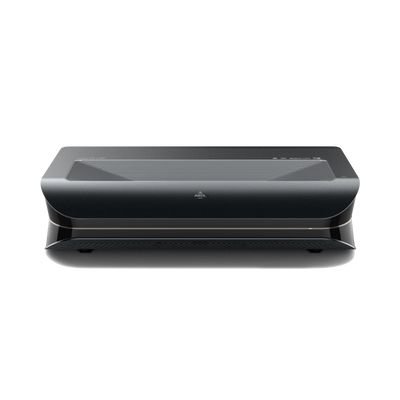
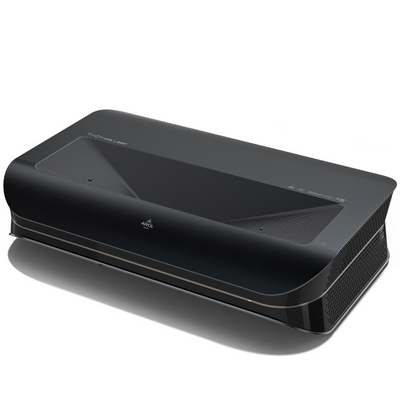
In a top-tier home theater setup, the projector acts as the central switching point for all your devices. The signal path with an ultra short throw projector like the AWOL Vision LTV-3500 Pro is a perfect example of this:
A source device such as a 4K player is connected to one of the LTV-3500 Pro's standard HDMI inputs. The projector processes the 4K Dolby Vision video signal and displays it on the screen. At the same time, it passes the untouched, uncompressed Dolby Atmos audio signal through its dedicated HDMI eARC port to a connected soundbar. The projector becomes the high-tech hub of your entire system.
Which HDMI cable for eARC? (A common question answered)
There is a clear answer here: No, not every HDMI cable is eARC-capable. Since eARC transmits such a large amount of data, you need a cable that can handle it. Look for one of the following labels:
- HDMI cable with Ethernet
- Ultra High Speed HDMI cable (recommended for full future-proofing)
These cables have the necessary data channels to support eARC's high bandwidth.
Common problems and solutions (troubleshooting)
If eARC does not work right away, it is often due to small settings.
No sound? Check these settings
- Make sure eARC (sometimes also referred to as HDMI-CEC) is enabled in the settings menus of all devices - meaning the projector, the soundbar, and the source device.
- Check that the HDMI cable is plugged into the ports explicitly labeled "eARC" or "ARC".
- Make sure the input on your soundbar or AV receiver is set to "eARC" or "TV".
Audio dropouts or interference?
The most common cause of unstable audio in an eARC connection is an inadequate or faulty cable. Test the connection with another certified Ultra High Speed HDMI cable to rule this out as the source of the problem.
Conclusion: Why eARC is essential for your home theater
eARC is more than just a technical acronym; it is the key to true cinema sound in your own home. It is the modern standard for lossless, immersive audio like Dolby Atmos and an absolute must for any high-quality home theater.
While it is often discussed in the context of TVs, eARC reaches its full potential in a projector-based home theater. It allows an advanced device like the AWOL Vision LTV-3500 Pro to act as the heart of a powerful and elegantly uncluttered system - one where the sound is finally just as breathtaking as the picture.